Wednesday, 26 June 2013

Design for thought


Before I start developing a new piece of software, be it a new module for an existent software or a new application I find it useful to create couple of UML diagram to get a feeling of the design and the different moving parts that will make up the new module or application.

On the spirit of being agile and yet no cowboyish I just create the necessary information on the diagrams before I star development. There is a good post on whether UML is dead or not. I concur on how the author uses UML on his projects. Is UML on the way out?

You could have few UML diagrams and yet apply your favourite agile approach such as TDD (Test Driven Development) to the development phase.

Now a bit of context. I want to build a web application using the suepr-dupa .NET technology. This web application will help school to manage their information. The application is targeted to schools in developing countries so for simplicity the components will be deployed on a single server.

Few infrastructure requirements that can start our brain working are:
  • The application will run on a .NET web server.
  • The application will follow the three tier model.
  • To minimize up front investment on new hardware the application components will be
    deployed  on a single server.
  • The application will use a relational database for the storage of its data.

The .NET web server is easy to pin point. IIS.  IIS comes already as a role in many windows server operating systems such as Windows 2008 and 2012. The database can be MS-SQL 2008.

So a simple deployment diagram , based on are few infrastructure, look like this:


As we can see from the above diagram the application will be available to users via personal computer or laptops or/and other personal devices such as tablets and smart phones. HTTP will be the application protocol Notice that I only put the necessary information on the deployment diagram.

This deployment diagram got me thinking that the application could be deployed to an ASP NET application such as SharePoint. SharePoint is becoming a dominant platform for collaboration, portals, business intelligence, integration and content management..

Microsoft offer SharePoint Foundation version for 2010 and 2013 so organisations that have a valid server license can start using several of the awesome SharePoint functionality for free.

For a features comparison between SharePoint Foundation 2010 and the other editions you can visit this site: SharePoint 2010 Feature Comparison

For a feature comparison between SharePoint Foundation 2013 and the other edition you can visit this site: SharePoint 2013 feature comparison

A deployment diagram for SharePoint looks very similar to the one for ASP NET


 For simplicity reasons I am leaving the different SharePoint deployment option out.

For instance, will the application will be deployed as a Feature Solution with farm or site scope?
Will the application take advantage of the new SharePoint 2013 application model, (i.e SharePoint Apps)

This simple deployment diagrams already got me on a design mode and I can see that some application component could be decoupled from our target platform be it ASP .NET or SharePoint.
So I came up with modified deployment diagram.


Please note that Service layer can be deployed on the same server where the Presentation and Data access layer will reside. I decided to put it in separate deployment node as it also could run as a self hosted server outside IIS

In this design the service layer could be implemented as a set of RESTFUL services. We could implement the application RESTUL Api using either WCF or the new kid on block "ASP NET Web API".  I tend to favour Web API as it has less over head than WCF and our default application protocol is HTTP anyway.  If the application was to support other communication protocols like raw TCP/IP or UDP then WCF would be my first choice.

For SharePoint this design would work well because the SharePoint client object model supports RESTFUL services.  The improvement on the design is that our service layer can be nicely decoupled of the hosting environment (i.e. SharePoint).


Food for thought


For few months I have been thinking on another way, beside blogging, on contributing to the wider community.

Blogging is a very nice way of sharing your knowledge. How many of us have been stuck on a technical issue and found one or more pointers on Google? it took some one to experience the same kind of problem and then the will to share his or her experience through a blog or diary.

I originally come from a third world country and I have been thinking that there may be some organisations, on developing countries,  that want to improve their process through the use of software. Some of these organisations may not be able to afford such software or the configuration of a complex software system. So after some thought I decided that my personal project would be to build a software to help schools to manage their information.

I am planning to develop the main core of the functionalities or modules and then release it as an open source so other developers can contribute to it as well.

As always if you have any thought about this endeavour of mine , please feel free to comment on it.

Thursday, 23 May 2013

Infamous HAL_INITIALIZATION_FAILED message while installing Windows 2012


Several  weeks ago I decided to install Server 2012 on a development VM. For VM I usually use VMWare.  A while ago I was able to install and configured Windows 2008 R2 using Vmware Player. It worked fine .

Since it worked last time  I decided to re-use the recipe. I grabbed an ISO image of Windows 2012 developer's edition and mounted into a logic drive using 'Virtual Clone'. So I created the VM that would host Windows 2012 and I started it up expecting that it will pick up the mounted drive.


No, VMware Player was not able to detect a valid operating system. I did some research and found on some forums people suggesting to create an installation DVD from the ISO image. Some folks had luck with VMware detecting the operating system installation from bootable physical media.

Cool, I shall try that. I did. There was a joy for few minutes and then the installation crash . It was the eventful evening that I got introduced to the 'blue screen of the sad face'


I did another research and found some pointers. I tried several of them . No Joy.
I found one interesting post of  someone, Daniel Marquard, having the same issue with Windows 8. The solution that works on his  case was an upgrade to the latest ESXi

http://www.technosultants.com/blog/fix-hal_initialization_failed-windows-8-error-in-esxi

I just didn't feel like upgrading my Wmware at all. I heard of VirtualBox so I decided it to give it a go.
VirtualBox was able to detect the installation disk and run windows 2012 installation to completion.
No more 'blue scree of the sad face'.

One thing I found cool with Windows 2012 is the 'Desktop view' . If you press the windows 'Start' key You get
a nice view of the apps


What have been your experience installing Windows 2012? Do you find Windows 2012 easier to use than Windows 2008? More intuitive or not?


Saturday, 23 March 2013

LNK1255: link failed because of metadata errors


I got this error while playing around with C++ VS 2010 projects.

On my configuration I had several MFC DLL projects. One of them with a configuration type of static library (.lib) and the others were Application (.exe). All of them use MFC in a Shared DLL and have Multi-threaded Debug DLL (/MDd) on the Run Time option of the Code Generation setting.

It occurred to me to add a new project that will act as a Unit Test for the Application (.exe) and the Library (.lib) projects.

I read about NUnit and decided to give it a go. Now all of the projects are unmanaged C++  whereas the project for the Unit Test had to support managed code  as I decided to use Nunit.

I got some cool instructions on how to set up a managed unit test project with native C++ code here:

http://www.codinginlondon.com/2008/11/using-nunit-with-native-c.html

After creating the managed C++(CLR) class project and following the instructions on that blog I was ready to build the solution and started mocking around with the Unit Test.

Well, while building the solution I got these error messages:


Error 23 error LNK1255: link failed because of metadata errors
Error 17 error LNK2022: metadata operation failed (8013118D) : Inconsistent layout information in duplicated types (std._String_const_iterator,std::allocator >): (0x02000019).
Error 20 error LNK2022: metadata operation failed (8013118D) : Inconsistent layout information in duplicated types (std._String_iterator,std::allocator >): (0x02000080).
Error 21 error LNK2022: metadata operation failed (8013118D) : Inconsistent layout information in duplicated types (std._String_val >): (0x02000081)

Ummm. no good. Not good at all. I did some research using Google and found few hints but none of them gave me the right solution or just didn't apply to my configuration.

http://stackoverflow.com/questions/4842205/getting-error-when-compiling-debug-mode-c-cli-error-lnk2022
http://stackoverflow.com/questions/11990095/lnk2022-metadata-operation-inconsistent-layout-information-in-duplicated-types

The last stackoverlfow question and answer looked very promising. however , it didn't work for me. So I re-built the solution and copied the warning and error messages, as displayed on the output window of Visual Studio 2012, and went through it one by one.

I found a warning that was interesting:

defaultlib 'msvcrtd.lib' conflicts with use of other libs; use /NODEFAULTLIB:library.

This warning came from the managed C++ Class Project. The one containing the Unit Tests. ummm.

The message tell me that there is a conflict of library between the projects. First thing it came to my mind was to go back and check the Code Generation settings, particularly the  Run Time option.

It was then that I noticed that the Managed class project acting as the Unit Tests Project had a Multi-threaded DLL (/MD) setting on the Run Time option of the Code Generation settings.

On the other hand all of the other projects, native/un-managed C++, had the Run Time as Multi-threaded Debug DLL (/MDd)

So I changed the Run Time setting for the managed class project  to  Multi-threaded Debug DLL (/MDd) and all the link errors disappeared.

For a good explanation of the CRT link libraries (Run Time option) You can visit this link to a QA on
stackoverflow: http://stackoverflow.com/questions/3007312/resolving-lnk4098-defaultlib-msvcrt-conflicts-with

Until next time, bye.


Sunday, 27 January 2013

rand_s

As we know the rand function in C++ generates a pseudo random number. The rand_s function is a version
of the rand function with security enhancements.

If you ever have wanted to use the security enhanced version ,rand_s,  and after including the
necessary reference to the stdlib library  , #include ,  you still get a compile error error C3861:

error C3861: 'rand_s': identifier not found

You will need to include a macro on your code. My personal choice, which  I found more convenient,
is to add the macro _CRT_RAND_S in the "C++\Preprocessor  property page


You can find more information on rand_s on this following MDSN page

Sunday, 25 November 2012

Building a DSN less connection for OLE DB

Needed to hook a Windows application to an MS-Access database . The windows application would insert records into the tables when the end user choose one of the application's menu option.

I thought that it would be good idea to free up the end user from having to create the databases DSN using the ODBC data source administrator control panel. A DSN less connection string look like this

"Provider=Microsoft.ACE.OLEDB.12.0;Data Source=C:\\myapplication\\mycooldb.accdb"

The only down size of this is that I would have to hard code this somewhere on the source code.

Wait! Since the database will be distributed with the application what about if  'Data Source"' property gets built dynamically.

To achieve this it's need to retrieve the directory of the running application , append to this the database name and make sure that the Provider property is included.

CString myDatabasePath;
CString connString (_T("Provider=Microsoft.ACE.OLEDB.12.0;Data Source = "));

//this get the file path of the application ,chop  off the executable name and
// add the database name
GetModuleFileName(NULL,myDatabasePath.GetBufferSetLength(MAX_PATH),MAX_PATH);
myDatabasePath.Truncate(targetDir.ReverseFind('\\') + 1) ;
myDatabasePath +=        "mycooldb.accdb";

// add the database path (i.e C\myapplication\\mycooldb.accdb) to the connection string
connString += myDatabasePath

//need to do this since  OLE DB is used
BSTR bstrConnString = connString.AllocSysString();
hr = _db.OpenFromInitializationString(bstrConnString);

//free up string used
targetDir.ReleaseBuffer(MAX_PATH);
SysFreeString(bstrConnString);

Sunday, 15 April 2012

Where is my ODBC driver gone?


Hello Boys and Girls,
Just finish installing some database drivers for SQLAnywhere 5.0 in my Windows 7.
I have the Professional version of Windows 7.

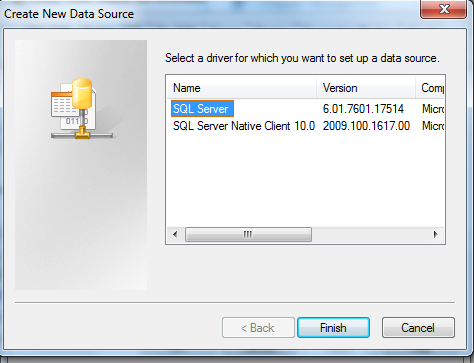
After the installation of the drivers I wanted to create an ODBC data source.

To my surprise when I went to the Control Panel->All Control Panel Items->Administrative Tools->Data Sources (ODBC)
and tried to add a new datasource the recently SQLAnywhere driver was not there.
The only drivers listed on the ODBC data source administrator were: SQL Server and SQL Server native client.
No trace of any drive for SQLAnywhere.


After spending 10 or 15 minutes with my friend Google I found one interesting fact:
There are two ODBC data source administrator executable (odbcad32.ex) in my Windows 7:
One is located on C:\Windows\System32 and the other is located in C:\Windows\SysWOW64


To manage a data source that connects to 64 bits driver, under a windows 7 64 bits, the odbcad32.exe located
on C:\Windows\System32

To manage a data source that connects to a 32 bit driver, under a 64 bits platform, the odbcad32.exe located on
C:\Windows\SysWOW64 should be used.

Snce I want to create a data source for the SQLAnywhere 5.0 driver which is a 32 bits I should use the odbcad32.exe located on, C:\Windows\SysWOW64
once I double click on it I was presented with the familiar ODBC data source administrator and then I clicked on "Add" I could see the SQLAnywhere 5.0
driver.


Problem solved.